Jira Approval Validator Not Working and How to Fix It
 Software Testing Mentor and RCV Academy

Jira approval steps skip workflow validators and conditions by design. Here is why, plus the interim status pattern that makes your checks run again.
Summary: Approval ignores required field validator
Steps to reproduce:
- Add an approval step to the Awaiting Approval status.
- On the Approve transition, add a validator that makes Release Notes required.
- As the approver, open a work item with Release Notes empty and select Approve.
Expected: Jira blocks the approval until Release Notes is filled in.
Actual: The work item is approved and moves on. Release Notes is still empty.
Resolution: Works as designed.
If you have logged this bug yourself, you are in good company. The same question comes up again and again on the Atlassian Community, and the answer surprises people every time.
This Is Expected Behavior, Not a Bug
Atlassian's support article on validators not working on approval step transitions is direct about it. Approval steps bypass workflow validators, and Atlassian describes that as expected behavior. The approver can approve or decline even when a required field is empty.
Conditions get the same treatment. A long standing Atlassian suggestion, JSDCLOUD-8120, raised in 2019, notes that approvals ignore workflow conditions on the transitions to approved and declined statuses. A condition that limits who can use the Approve transition is not evaluated, and the request itself describes the current behavior as working as designed. It is still gathering interest.
Most of that history comes from Jira Service Management, where approvals have existed for years. If you are using the newer approvals in Jira Premium, do not assume it is different. A suggestion filed in December 2025 under the Jira Approvals component, JRACLOUD-96915, asks for exactly the same fix: approval steps should not bypass workflow validators. Plan your workflow as if the bypass applies, then test it yourself.
Here is the mental model I give teams. A normal transition is a person clicking a button, so Jira checks that person and that data first. An approval outcome is Jira recording a decision and moving the work item on the approvers' behalf. Your checks were attached to a door that the approval never walks through.
The Interim Status Fix
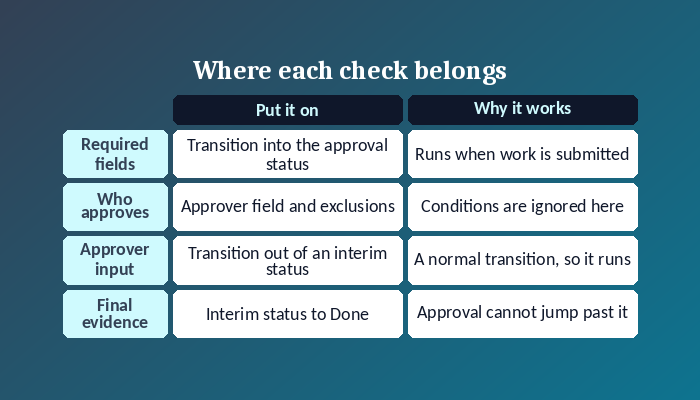
Atlassian's own workaround is simple: you cannot enforce the validator on the same transition as the approval step, so use two transitions. Put the check on a normal transition, before or after the approval, where Jira will actually run it.
In practice, that means adding one status. A typical release workflow ends up like this:
- In Progress to Awaiting Approval through a "Submit for approval" transition. Validators here make sure the requester has filled in everything the approver needs: release notes, test evidence link, affected version.
- Awaiting Approval holds the approval step. Approved goes forward. Declined goes back to In Progress.
- Approved is the interim status. It exists only so the next transition can carry checks.
- Approved to Done through a "Release" transition. Validators here cover anything that must be true after the decision: a change window date, a deployment reference, or a field the approver was asked to complete.
The first validator catches incomplete requests before anyone is asked to approve. The second catches anything the approval let through. Neither depends on the approval step behaving differently.
Setting It Up Without Creating New Gaps
An interim status fixes the validator problem, but it adds a status that people can find ways around. Four details keep the gate honest.
Close the side doors. If Approved or Done accepts transitions from any status, someone can skip the whole chain. Remove those global transitions and draw explicit arrows instead.
Control approvers in the approval step, not with conditions. Because conditions are ignored, use the approval configuration itself. Atlassian's guide to setting up approval steps lets you choose the approver source, how many approvals are needed, and which fields' users are excluded from approving. That is where "the reporter cannot approve their own change" belongs.
Put the interim status in the right category. Approved is not finished work. Keep it in the In Progress category so dashboards and progress bars do not count it as done, and map it to a board column left of your rightmost column so sprints do not treat it as complete.
Name it so nobody parks work there. "Approved, Awaiting Release" tells people the item still needs a step. A bare "Approved" invites people to leave it there.
If workflow statuses, transitions, and categories are new territory, the Jira Masterclass: Agile Project Management, Administration & AI builds a workflow like this from scratch.
Test It Like Any Other Change
Atlassian's article recommends testing as both the requester and the approver. I would go further and treat the workflow change like a small release with its own test cases:
- Submit with a required field empty. The Submit for approval transition should block with a clear error.
- Approve as an excluded user. The reporter, or whoever you excluded, should not be able to approve.
- Approve, then try to reach Done with a release field empty. The Release transition should block.
- Try every route to Done that skips Awaiting Approval. Board drag, the status dropdown, and any automation rules. None should work.
- Decline, then resubmit. The work item should return to In Progress and go through the submission validators again.
Run these on a copy of the workflow in a test space first. Changing an approval configuration can strand work items that are already waiting for a decision.
Five test cases is a small investment against an audit finding that says your approvals approved incomplete releases. If you want a structured way to design checks like these, the ISTQB Certified Tester Foundation Level (CTFL v4.0.1) course teaches the test design techniques behind them, from equivalence partitions to state transition testing. Your workflow is a state machine. Test it like one.
Categories: : JIRA, Jira Workflow