Jira Auto Assign on Transition: Perform Actions Guide
 Software Testing Mentor and RCV Academy

Jira auto assign on transition: use Perform actions to assign bugs to the right person and auto clear stale fields, with four QA workflow recipes.
"Who has this bug?"
"Not me. I moved it to Ready for Test yesterday."
"Then why is it still assigned to you?"
If that conversation sounds familiar, the bug is not really the problem. The handoff is. Every time a work item changes hands and nobody updates the assignee, it sits in the wrong person's queue, and the person who should pick it up never sees it. Old values cause a similar mess: a reopened bug still shows the fix version and resolution from its first, failed attempt.
Jira can handle both jobs on its own, at the exact moment a transition happens, using two Perform actions rules. Here is how to set them up for a typical QA bug workflow.
Where these rules live now
In the current Jira Cloud workflow editor, every transition has a Rules panel, and Perform actions is the group that runs after the work item moves. According to Atlassian's page on the workflow editor, two rules absorbed most of the old assignment and clearing post functions:
- Assign a work item replaced Assign to Current User, Assign to Reporter and Assign to Lead Developer, and also covers setting the assignee through Update Issue Field.
- Update a work item's field replaced Update Issue Field, Update Issue Custom Field and Clear Field Value.
To add either one, open the workflow, select a transition, choose Add rule and pick it from the Perform actions group. Each transition can carry several actions, so one move can reassign a bug and clear three fields at once.
Here is the full flow we are about to build.
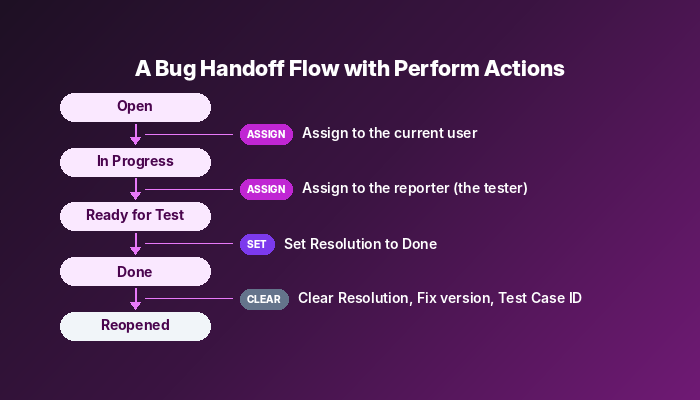
Four recipes for a QA bug workflow
Recipe 1: Open to In Progress, assign to the current user
Add Assign a work item and choose the current user. "Current user" means whoever performs the transition, so the developer who clicks Start work owns the bug from that moment. Nobody has to remember to assign themselves first, and the board stops showing work in progress with no owner.
Recipe 2: In Progress to Ready for Test, assign to the reporter
On most QA teams, the person who logged the bug is the best person to verify the fix. Add Assign a work item and choose the reporter. When the developer moves the bug to Ready for Test, it lands straight back in the tester's queue.
If your team routes all verification through a QA lead instead, choose a specific person here. If your testers track verification runs in a test management tool, this is also the point where Zephyr for Jira picks up: the bug arrives with the tester, and the test execution links back to it.
Recipe 3: Ready for Test to Done, set the resolution
Add Update a work item's field, choose Resolution, and set it to Done. Moving a bug into a Done status does not fill Resolution by itself, and an empty Resolution makes Jira treat the bug as unresolved in filters and reports. This one action keeps your dashboards honest.
Recipe 4: Done to Reopened, clear the old values
This is the auto clear recipe, and it is where most workflows fall short. Add Update a work item's field once for each field you want wiped, and choose the option to clear it:
- Resolution, so the reopened bug counts as unresolved again
- Fix version, because the version it was meant to ship in has probably moved
- Test Case ID or any similar verification field, so the next pass records fresh evidence
You can add Assign a work item to the same transition too. A common choice is to route reopened bugs to a lead for triage rather than straight back to the original developer.
Three things that make auto assignment backfire
The assignee must be assignable. Jira can only assign a work item to someone with the right permissions in that space. Atlassian's knowledge base article on auto assignment notes that users need the Browse Projects and Assignable User permissions. If the reporter is a stakeholder outside the delivery team, Recipe 2 can fail for their bugs. Check your permission scheme before relying on it.
Clearing and validating on the same transition fight each other. If the reopen transition also has a Validate details rule that requires Fix version, testers will be asked for a value that the clear action wipes straight after. Keep validators on the way into Done and clearing actions on the way out.
Test with a throwaway work item first. Create a sample bug, walk it through every transition, and check the assignee and fields at each step. It takes two minutes and catches the rule that was added to the wrong transition.
When Automation is the better tool
Perform actions are deliberately simple: current user, reporter or one named person. If you need anything smarter, use Jira Automation instead. The same Atlassian article describes three ways an Automation rule can share work across a team:
- Round robin: each new work item goes to the next person in the list
- Balanced workload: the person with the fewest open work items gets the next one
- Random: any team member, picked at random
Automation also suits rules that span several spaces or need to notify people in other tools. A good split is to let Perform actions handle what must happen on a specific transition, and let Automation handle distribution and notifications.
If your spaces are team managed, the setup is slightly different: Atlassian's guide to board rules for those spaces shows how to change the assignee when work moves between board columns.
Add Recipe 2 to your bug workflow before your next standup, then watch how many "who has this?" questions disappear by Friday. To build the whole workflow, schemes and automation included, from a blank site, the Jira Masterclass: Agile Project Management, Administration & AI walks through every step.
Categories: : Agile Tester