Jira Linked Issue Validator: Free JMWE Alternative
 Software Testing Mentor and RCV Academy


No native Jira linked issue validator? Enforce linked test cases for free with a required field, an automation safety net and a JQL audit.
Open your bug workflow. Click the transition that moves a bug into Done. Now look for a rule that says "this bug must be linked to a test case before it can close."
You will not find one.
Jira Cloud can force a field to be filled, check permissions and check a work item's history. It cannot natively check whether a work item has a particular kind of link. For QA teams that care about traceability, that gap matters: a defect closed with no test case behind it is a defect nobody can prove was verified.
The usual answer is a paid app. This post shows how far you can get without one, using three free layers that work together.
Why Jira cannot check links on its own
In the new workflow editor, validators live under Validate details. According to Atlassian's guide to the new workflow editor, the available rules are: validate a field, require a form to be attached, require a form submission, validate that parent work items are in a specific status, validate that people have a specific permission, and validate that a work item has been through a specific status.
None of them looks at issue links. That is the gap apps fill. The JMWE Linked Issues Validator can block a transition unless certain linked issues exist, and can even check conditions on those linked issues. It works well. It also means another app to buy, approve and maintain.
If that is not an option for your team, here is the free version.
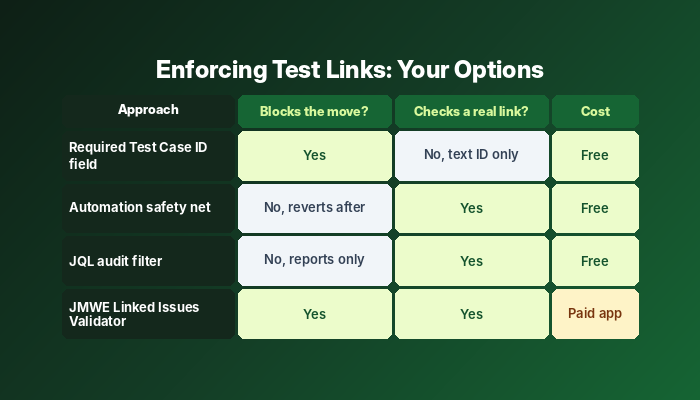
Layer 1: make the test case a required field
This is the only free option that actually stops the transition. The idea is simple: if Jira cannot validate a link, give it a field it can validate.
- Create a custom field. Go to Settings, then Work items, then Fields, and create a short text field called Test Case ID. Add it to the field scheme your bug work type uses.
- Put the field on the screen. This step gets missed constantly. If testers cannot see the field on the bug view, or on a transition screen, they cannot fill it in, and every close attempt fails with no obvious fix.
- Add the validator. Edit the bug workflow, select the transition from In Testing to Done, and add a Validate details rule. Choose Validate a field, set the condition to "isn't empty", and pick Test Case ID.
- Write a useful error message. Something like "Add the Test Case ID this bug was verified against before closing." Testers should know exactly what to fix.
Now nobody closes a bug without naming a test case. You can add Fix version to the same rule so both are enforced in one place.
The weakness is obvious: it is a text field, not a real link. Someone can type "N/A" and move on. Agree a naming convention, such as TC followed by a number, and spot check it in reviews. If custom fields and screen schemes are new territory, the Jira Masterclass: Agile Project Management, Administration & AI covers both in detail.
Layer 2: an automation safety net for real links
Layer 1 proves someone named a test. Layer 2 checks that a genuine link exists, using Jira Automation, which is included with Jira Cloud within your plan's monthly rule run allowance.
First, create a dedicated link type so test links are easy to identify. In the work item linking settings, add a type called Tests, with "tests" as the outward description and "is tested by" as the inward one. Using the default "relates to" type here makes every check meaningless.
Then build the rule:
- Trigger: Work item transitioned, to Done
- Condition: Related work items condition, set to Linked work items, link type "is tested by", are not present
- Actions: transition the bug back to In Testing, then add a comment mentioning the assignee that explains why
Atlassian's documentation on related work items explains this condition in detail.
Two honest caveats. First, this runs after the transition, so it corrects rather than blocks. The bug briefly reaches Done before bouncing back. Second, Atlassian has a known bug, AUTO-774, where "are not present" checks both link directions even when you select one. The workaround Atlassian suggests is to reverse the logic: test whether the links are present and put your actions on the other branch. Test the rule on a sample bug before you switch it on for the whole space.
Layer 3: a weekly JQL audit
Automation catches problems one at a time. A saved filter shows you the pattern.
Jira Cloud supports the issueLinkType field in JQL, so this query lists closed bugs that do have a test link:
issuetype = Bug AND status = Done AND issueLinkType = "is tested by"
Compare that count with all closed bugs. If 40 bugs closed this sprint and only 31 appear here, you have nine to chase. Note that issueLinkType is EMPTY is not reliable in Jira Cloud, so do not build your audit on it. Put the filter on a team dashboard and review it in your sprint retrospective.
Teams already paying for a test management app get much of this out of the box. Zephyr for Jira shows coverage and links tests to requirements directly, which removes most of the manual checking.
When paying for JMWE does make sense
The free approach covers most teams. It is worth buying an app when you need a true hard block on real links rather than a text field, when you need to check something about the linked issues themselves (for example, that every linked test has passed), or when you are maintaining this rule across many workflows and the automation logic is becoming hard to follow.
Pick the one bug workflow your team closes most often and add Layer 1 to it this week; the other two layers can follow once that is working. If your team is ready to move from a Test Case ID field to full test management inside Jira, Master Xray Test Management for Jira Software in 4 Hours is the practical next step.
Categories: : Agile Tester