Building a Jira to Playwright Pipeline with AI Agents: A Practical Walkthrough
 Software Testing Mentor and RCV Academy
A hands-on walkthrough building a Jira to Playwright pipeline with real code, the Microsoft Agent Framework, and a human approval gate.
Most write ups on agentic QA pipelines describe the architecture, show a diagram, and stop right before the actual code. This one does not. Below is a working two agent pipeline built with the Microsoft Agent Framework, reading a Jira ticket, drafting a Playwright test, and pausing for your approval before anything gets written to disk.
What you need before starting
- Python 3.10 or newer
- A Microsoft Foundry, Azure OpenAI, or OpenAI account for the model calls
- A Jira API token if you want to pull real ticket data rather than pasting it in manually
- Fifteen to twenty minutes
Install the framework with a single command.
pip install agent-framework
Microsoft Agent Framework reached general availability in April 2026, unifying what used to be two separate Microsoft projects, AutoGen and Semantic Kernel, into one SDK with the same API across Python and .NET.
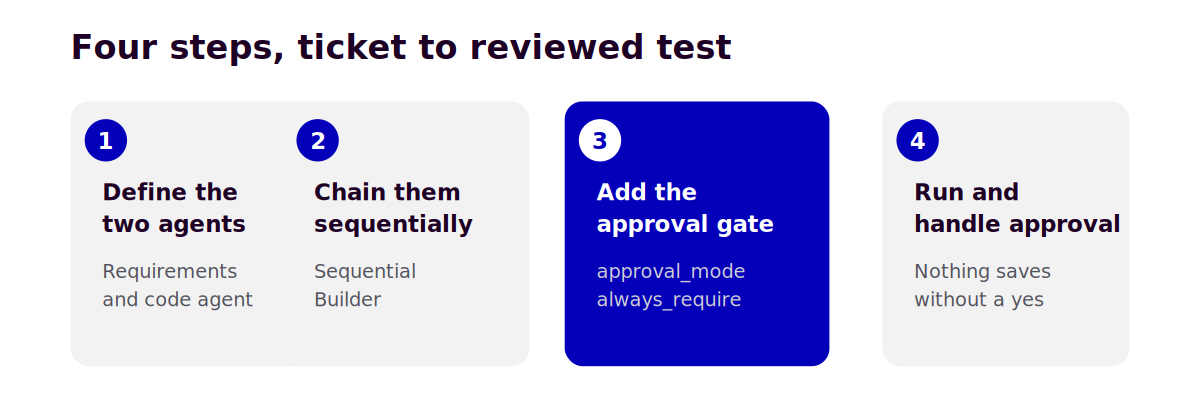
Step one, define the two agents
Each agent gets a narrow job and nothing else. The first reads a ticket and produces a structured test scenario. The second turns that scenario into an actual Playwright test.
from agent_framework import Agent
from agent_framework.openai import OpenAIChatClient

client = OpenAIChatClient(model="gpt-4o")

requirements_agent = Agent(
    client=client,
    name="RequirementsAgent",
    instructions=(
        "Read the Jira ticket description and acceptance criteria. "
        "Produce a structured test scenario, what should be tested, "
        "the expected outcome, and edge cases implied by the criteria "
        "even if not stated explicitly."
    ),
)

code_agent = Agent(
    client=client,
    name="CodeAgent",
    instructions=(
        "Take a structured test scenario and write it as a Playwright "
        "test in TypeScript, following existing project conventions "
        "for page object structure and naming."
    ),
)
Nothing unusual here if you have written a system prompt before. The instructions are the entire personality of each agent. If you have not written a Playwright test by hand before, it is worth doing that first, since you will need to recognize a bad locator or a weak assertion when the code agent produces one, and RCV Academy's Playwright course covers exactly that foundation.
Step two, chain them into a sequential workflow
This is where the framework actually does work for you. Instead of manually passing output from one agent's response into the next agent's input, SequentialBuilder handles that handoff.
from agent_framework.orchestrations import SequentialBuilder

workflow = SequentialBuilder(
    participants=[requirements_agent, code_agent],
).build()
Two agents, in order, output from the first becomes input to the second. This is the simplest orchestration pattern the framework offers, and it maps directly onto the two step pipeline described above.
Step three, add the human approval gate
This is the part that matters most and the part most tutorials skip. Rather than letting the code agent's output run or merge automatically, wrap the action that actually writes the file as a tool requiring explicit approval.
from typing import Annotated
from agent_framework import tool

@tool(approval_mode="always_require")
def save_test_file(
    filename: Annotated[str, "The test file path to write"],
    content: Annotated[str, "The generated Playwright test code"],
) -> str:
    """Save the generated test to disk once a human has approved it."""
    with open(filename, "w") as f:
        f.write(content)
    return f"Saved {filename}"
The approval_mode="always_require" setting means the framework pauses the workflow and emits a request whenever this specific tool is about to run, regardless of how confident the agent is. This is the same tool approval mechanism documented for the framework generally, applied here to the one action in this pipeline that actually matters, writing a file. Nothing reaches your file system without that pause happening first.
Step four, run it and handle the approval
When the workflow hits the approval required tool, it returns a pending request instead of a result. Your code checks for that, shows the human the details, and only continues once approved.
result = await workflow.run(jira_ticket_text)

if result.user_input_requests:
    for request in result.user_input_requests:
        print("Approval needed for:", request.function_call)
        approved = input("Approve this write? (y/n): ").strip().lower() == "y"
        result = await workflow.send_approval(request, approved)

print(result.text)
In a real pipeline this approval step would be a Slack message with buttons or a review link in your CI dashboard rather than a terminal prompt, but the underlying mechanism is exactly the same, the framework pauses, waits for an explicit signal, and only proceeds once it gets one.
What to actually expect the first time
The requirements agent tends to do well immediately, since summarizing a ticket into structured criteria plays to what language models are naturally good at. The code agent needs more attention. Expect the first several generated tests to use assertions that are technically valid but too weak, or a locator strategy that does not match your project's actual conventions. This is not a sign something is broken, it is why the approval gate exists. Treat the first few weeks of running this the way you would treat reviewing a new team member's pull requests, expect to correct course a few times before the output settles into your team's patterns.
Frequently asked questions
Do I need Azure or Microsoft Foundry specifically to use this framework? No. Agent Framework supports Microsoft Foundry, Azure OpenAI, plain OpenAI, Anthropic, Ollama, and other providers through the same API, so the code above works with a standard OpenAI account without any Azure setup.
What happens if I reject the approval instead of approving it? The workflow receives your rejection and the agent can be prompted to revise its output based on feedback you provide, rather than starting over from nothing, similar to how a human would hand back a pull request with comments.
Can this run without a human in the loop once I trust it? Technically yes, by changing the approval mode, but that defeats the actual purpose. The value of this pattern is catching the specific cases where a generated test looks plausible but tests the wrong thing, and that is exactly the category of mistake unsupervised review would miss.
If you want to see this pattern extended into a full three stage pipeline with an execution agent and failure classification, RCV Academy's Agentic AI for QA and SDET course builds on exactly this foundation with real project code throughout.
Categories: : AI, AI Roadmap, AI Tools