Jira Post Functions Are Now Perform Actions: Guide
 Software Testing Mentor and RCV Academy

Jira post functions are now Perform actions. See what changed in the new workflow editor, how old rules map, and three gotchas for QA teams.
Before: Transition, then Post Functions, then Add post function.
Now: Transition, then Rules, then Perform actions.
That is most of the change. If you learned Jira workflows a few years ago, the job you know as a post function still exists. It has a new name, a new home in the editor and, in one case, a genuinely new ability. Here is what moved, what stayed the same and where QA teams get caught out.
What actually changed
Jira Cloud now has only one workflow editor. Atlassian announced that the final removal of the old editor would run from 13 July to 26 July 2026, after which all workflow editing happens in the new editor with no option to switch back. The final deprecation notice also confirms that existing workflows did not need migrating. They keep working and open in the new editor.
In the new editor, every transition rule sits in one of four groups: restrict transition, request input, validate details and perform actions. Perform actions is where post functions went. The behaviour is the same: these rules run automatically after a work item moves through the transition.
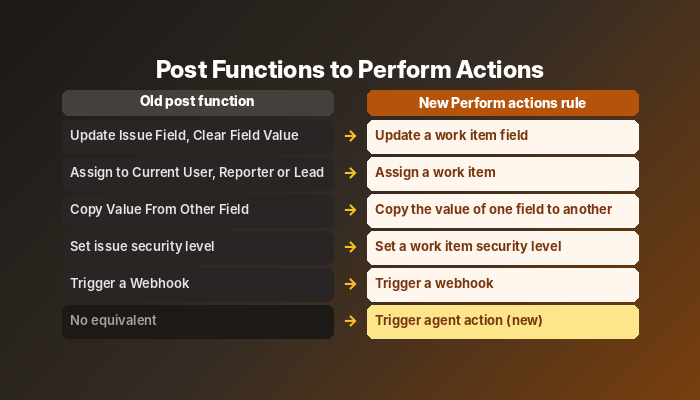
What changed is the grouping. Several old post functions now share one rule. Atlassian's guide to the new workflow editor includes the full mapping table, and the short version looks like this.
The rules you will use most, with QA examples
Update a work item field. This absorbed Update Issue Field and the clear field option. It is the rule you will reach for most. Two examples every QA workflow should have: set Resolution to Done on the transition into Done, and clear Resolution on any transition back out of it.
Assign a work item. Assign to Current User, Assign to Reporter and Assign to Lead Developer all live here now. A practical use: when a story moves from In Progress to In Review, assign it to the development lead automatically, so nobody has to remember to hand it over.
Copy the value of one field to another. It works within the same work item or from the parent. Useful when a subtask should inherit something like the fix version from its parent story.
Set a work item security level. Restricts who can see a work item once it reaches a certain status. Teams handling security defects use this to hide sensitive bugs as soon as they are confirmed.
Trigger a webhook. Notifies an external system that a transition happened. A common QA example is telling a test runner or CI pipeline that a build is ready for testing.
Trigger agent action. This one is new, with no old equivalent. According to Atlassian's page on collaborating with AI agents, you can add a Rovo agent to a transition so it runs automatically when work moves between statuses. For example, an agent can summarise a bug's comments when it closes. If you are new to how these agents reason and act, the Generative AI and AI Agents for QA masterclass covers the concepts behind them.
Three gotchas that catch QA teams
1. Done without a resolution. Moving a work item to a Done status does not set the Resolution field by itself. Without an Update a work item field rule on that transition, Jira still treats the item as unresolved. Filters using resolution = Unresolved keep showing it, reports count it as open, and when you release a version Jira flags those work items as unresolved, which confuses everyone who can see them sitting in the Done column. Add the rule once and the problem disappears.
2. Clearing a field that a validator needs. A neat pattern is to clear Fix version and Test Case ID when a bug is reopened, so testers enter fresh values on the next pass. It goes wrong if the same reopen transition also has a Validate details rule requiring those fields. Testers are forced to enter a value that the action wipes a second later. Keep the validator on the transition into Done and the clearing action on the transition out of it.
3. Agents that cannot finish the job. An agent on a transition only does what its tools allow. If you ask it to post a comment and it has no commenting tool, it summarises the bug and then asks a human to paste the result. Atlassian is also tracking a bug, JRACLOUD-99042, where a custom agent with a comment skill fails to post when triggered from a workflow transition. Test agent rules on a sample work item before relying on them, and keep a person reviewing what the agent writes.
Perform actions or Jira Automation?
Both can run something after a transition, so which should you use?
Atlassian's workflows guide explains the difference: a workflow rule lives inside one workflow and applies wherever that workflow is used. Automation rules sit at the space or global level, work across workflows and connect to other tools such as Slack and Confluence.
A simple rule of thumb:
- Use Perform actions for things that must always happen on that transition, like setting the resolution or reassigning on review.
- Use Automation for anything that touches other spaces, other apps or notifications, or that should keep working if the space switches to a different workflow.
Open one workflow you own today, click each transition into and out of Done, and check that the Resolution field is being set and cleared. That five minute check fixes more broken Jira reports than any other single change. For the full picture of workflows, schemes and automation working together, the Jira Masterclass: Agile Project Management, Administration & AI takes you through each piece in a live Jira site.
Categories: : Agile Tester