Jira Workflow Roles vs Groups vs Users: Best Practice
 Software Testing Mentor and RCV Academy

Should Jira workflow conditions use space roles, groups or named users? Learn which stays maintainable, with a QA bug workflow and separation of duties.
January. The QA lead asks for one rule: only testers can move a bug from Ready for Retest to Closed. The Jira admin adds a condition listing the three testers by name. It works.
April. A fourth tester joins. Nobody remembers the rule. She cannot close bugs and assumes Jira is broken.
July. One of the original testers moves to the platform team. He can still close bugs in a space he no longer works in.
October. The admin who built the rule leaves. Nobody knows where the list of names lives, so people start asking developers to close bugs "just this once."
That is how a workflow rule decays when it points at people instead of responsibilities. The rule itself was fine. The target was wrong. Jira gives you several ways to say who can use a transition, and choosing the right one decides if your workflow still makes sense a year from now.
The four ways to say "who" in a transition rule
Atlassian's guide to advanced workflow configuration lists the conditions that restrict a transition by person. They fall into four families.
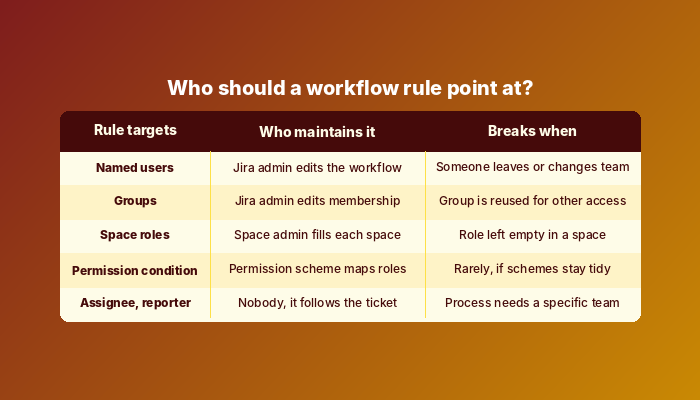
Named users. You point the rule at specific people, usually by putting their names in a user field and using the User Is In Custom Field condition. It is the fastest to set up and the first to break, because every hire, departure and team move needs a workflow edit.
Groups. The User Is In Group and User Is In Any Group conditions allow only members of a given group. Groups are better than names, but they have a catch. Group membership is global across your Jira site, and only users with the Administer Jira global permission can edit it. So a group called "QA Team" means the same people in every space, and every change goes through a Jira admin.
Space roles. The User Is In Space Role and User Is In Any Space Role conditions allow only people in a given role, such as Tester. Roles used to be called project roles, and older docs still use that name. The key difference, as Atlassian's page on how to use space roles explains, is that a Jira admin defines the roles once, and each space admin decides who fills them in their own space. One workflow, shared across twenty spaces, can mean a different set of testers in each.
The work item itself. Only Assignee and Only Reporter tie the rule to whoever is on that ticket. No list to maintain. The Permission Condition goes one step further and checks a permission, such as Resolve work items, which your permission scheme already grants to roles.
Why roles are the default for shared workflows
The moment a workflow is shared across more than one space, roles win on maintainability.
Think about who does the upkeep. With named users, every change is a workflow edit by a Jira admin. With groups, every change is a group edit by a Jira admin, and that group probably controls access to other things too. With roles, the space admin who actually knows the team adds the new tester to the Tester role in their own space, and the shared workflow keeps working without anyone touching it.
This is the same reason Atlassian's guide to Jira permissions recommends granting access through groups and roles rather than user by user, and granting permissions to roles in permission schemes instead of to named people. Workflow conditions follow the same logic.
Groups still have a place. They describe who someone is across the whole organisation, such as everyone in the QA department or all contractors. A clean pattern is to put groups inside roles: add the "QA Department" group to the Tester role in each space where the whole department tests, and add individuals to that role where only part of it does. Your conditions point at the role, and the role decides how membership is resolved.
A QA example: closing bugs and separation of duties
Here is a bug workflow rule set that survives team changes.
- Ready for Retest to Closed uses User Is In Space Role with the role Tester. Each space admin fills the Tester role for their own team.
- The same transition also uses the Separation of Duties condition, which Atlassian describes as preventing a user from performing the transition if they have already performed a transition on the work item. In practice, the person who moved the bug to Ready for Retest cannot also close it. That is a small, automatic form of independent verification.
- Reopen is open to anyone with the Tester role or the reporter, so the person who found the bug can always bring it back.
- Won't Do uses the Permission Condition tied to a permission your scheme grants only to the Administrators role, because rejecting a bug is a product decision, not a testing one.
Separation of duties connects directly to the testing principle of independence. The ISTQB Foundation syllabus explains why a second pair of eyes finds different defects than the author does, and ISTQB Certified Tester Foundation Level (CTFL v4.0.1) Certification Training covers the levels of independence in detail.
Three mistakes to avoid
Leaving a role empty. Atlassian's role documentation warns that having nobody in a role can make some space activities unavailable. If the Tester role is empty in a new space, nobody can close bugs there. Add role membership to your checklist for creating a space.
Reusing a group for everything. If "QA Team" controls space access, a Confluence space, a Slack integration and your close transition, nobody dares to change it. Keep groups for identity and give roles the job of workflow access.
Naming people as a quick fix. The temptation is strongest during an incident: "just let Priya close it for now." That exception will still be in the workflow next year. Add Priya to the role in that space instead. It is just as fast and it disappears when she moves on.
Open the workflow your team uses most, select each transition and list every condition that names a person or a group. Each one is a future support ticket, and most can be swapped for a space role in an afternoon. To redesign roles, permission schemes and workflows together as one system, the Jira Masterclass: Agile Project Management, Administration & AI covers each layer with hands on exercises.
Categories: : JIRA, Jira Workflow