Jira Workflow Triggers: Branch, Commit and PR Automation
 Software Testing Mentor and RCV Academy

Jira workflow triggers move work items on branch, commit and pull request events. Learn the safe setup, and why triggers skip conditions and validators.
Here is the whole post in one sentence: let development events move work forward into testing, but never let them move work out of testing.
Everything below explains why. Jira workflow triggers are one of the most useful features for keeping a board honest, because statuses update when developers do real work instead of when they remember to drag a card. They also have one behaviour that surprises almost every team that turns them on, and it lands squarely on QA.
What a workflow trigger does
A trigger is attached to a transition in a company-managed workflow. When a matching event happens in a connected development tool, Jira runs that transition on the linked work item automatically. Branch created can move a story from To Do to In Progress. Pull request created can move it to In Review. Pull request merged can move it to the next step.
According to Atlassian's guide to understanding workflow triggers, the events you can use depend on the tool:
- Bitbucket Cloud supports pull request events, commit created and branch created.
- GitHub supports pull request created and merged, commit created and branch created.
- Bitbucket Data Center supports all pull request events, commit created and branch created.
The link between the event and the work item is the work item key. The same guide says to include the key in the branch name when you create the branch, include it in the commit message for commits, and make sure a pull request contains commits whose messages reference the work item. A branch called feature/QA-142-login-timeout and a commit message that starts with QA-142 cover all three.
If the key is missing, nothing happens. That is the most common reason a team decides triggers are "broken" in their first week.
The behaviour every QA team needs to know
Here is the surprise. Atlassian's workflow trigger troubleshooting guide states that workflow conditions, validators and permissions are intentionally ignored for automatic work item transitions. Post functions, on the other hand, still run.
Think about what that does to the quality gates many teams build. If your workflow says only the Tester role can close a bug, a trigger ignores that condition. If a validator requires a fix version or retest evidence before Closed, a trigger skips it. If someone wires "pull request merged" to the transition into Done, every merged fix closes its bug instantly, untested, with no evidence and no tester involved.
That is why the rule at the top of this post matters. Merging code means a fix exists. It does not mean the fix works.
Two more details from the same troubleshooting guide are worth knowing before you go live:
Triggers belong to the workflow, not the space. If a workflow is shared across several spaces, every space gets its triggers. To use triggers in some spaces and not others, Atlassian suggests copying the workflow.
Some events run as an anonymous user. When Jira cannot map the person in the development tool to a Jira user, the triggered transition runs anonymously. Atlassian's trigger guide notes that branch events from Bitbucket Cloud and GitHub are not mapped to a Jira user at all. Any post function that depends on the current user may then behave unexpectedly.
A safe trigger setup for a team with QA
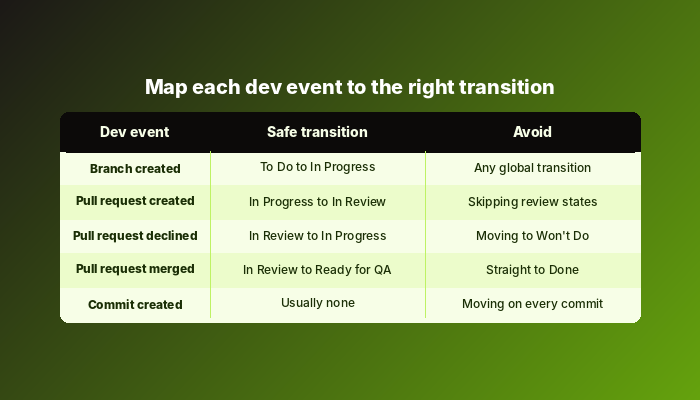
Map each event to a transition that moves work toward testing, and stop there.
Branch created: To Do to In Progress. A safe, useful trigger. It removes the most commonly forgotten manual update.
Pull request created: In Progress to In Review. Also safe, as long as In Review is a real status your team uses.
Pull request declined: In Review back to In Progress. Useful where your tool supports it. Per Atlassian's guide, GitHub's supported pull request events are created and merged, so this one applies to Bitbucket.
Pull request merged: In Review to Ready for QA. This is the key one. The merge hands the work to testing instead of finishing it. The tester then moves it to Done or Closed by hand, and that manual transition still enforces every condition and validator you built.
Commit created: usually no trigger. Commits are frequent and noisy. Moving work on every commit tends to bounce tickets between statuses and fills the history with meaningless changes.
Two configurations to avoid completely:
Triggers on global transitions. The troubleshooting guide recommends not configuring triggers for global transitions, and the trigger guide warns that a work item can then move unexpectedly from statuses such as In Review or Done. A global transition can be reached from anywhere, so a stray commit can pull a closed bug back into progress.
Triggers that close or resolve work. Any trigger into a Done category status bypasses your validators. If you also rely on a post function to set the resolution there, you get closed, resolved work items that nobody verified, and reports that call them finished.
The handoff from merge to test is where a CI pipeline and a test automation strategy meet the workflow. If you are designing that pipeline, the ISTQB Test Automation Engineer (CTAL-TAE) v2.0 Masterclass covers how automated test results should feed release decisions.
Rolling triggers out without surprises
Start with one transition, usually branch created to In Progress. Agree on the branch naming convention with the developers first, and put it in your team's working agreement so new joiners pick it up.
Run it for a sprint and check the history of a few work items to confirm the right transitions fired. Then add pull request created and pull request merged, pointing the merge at Ready for QA. Leave the final transition to Done as a human step owned by testing.
Keep one more detail in mind while testing your setup: the troubleshooting guide says only commits less than 21 days old will cause a transition, and that a delay of up to an hour is possible if Jira cannot reach the development tool directly. If a test commit does nothing, check the age of the commit and wait before assuming the configuration is wrong.
Pick one bug that was closed last sprint and open its history. If it went from merged to Done without a tester's name on the final transition, your workflow is already letting development events close work. Rewire that one transition to Ready for QA this week. For the full picture of workflows, triggers, automation and the Rovo features layered on top, the Jira Masterclass: Agile Project Management, Administration & AI builds a complete development workflow from scratch.
Categories: : JIRA, Jira Workflow