LangChain for QA Engineers: Building Your First AI Test Assistant
 Software Testing Mentor and RCV Academy
A hands-on LangChain tutorial for QA engineers, install it, give it a real testing tool, and build a working test case assistant.
Every QA engineer who has used ChatGPT to draft a test case has already done the easy version of this. The harder, more useful version is an assistant that can actually look things up, read a real API response, check a real file, and reason about what it found before answering. That is what LangChain is built for, and this walks through building exactly that, using the current, real syntax rather than an outdated tutorial pattern.
What LangChain actually is now
LangChain reached its first stable major release, version 1.0, in October 2025, and the framework changed meaningfully with it. Older tutorials you find online, including plenty still ranking well in search results, teach patterns like LLMChain and AgentExecutor that have since moved into a separate legacy package. The current, recommended way to build an agent is a single function, create_agent, which takes a model, a list of tools, and a system prompt.
That matters for a testing assistant specifically, since tools are exactly how you give the assistant the ability to check something real instead of just generating plausible sounding text.
Installing it
pip install -U langchain
That's the whole install. LangChain requires Python 3.10 or newer. You will also need an API key from a model provider, OpenAI, Anthropic, or Google Gemini are the most common starting points, set as an environment variable.
Building your first test assistant
Start with a single tool. This example gives the assistant the ability to check whether an API endpoint is actually returning what a test expects, rather than guessing based on a description. If you want to strengthen your REST fundamentals before layering AI on top of them, RCV Academy's API Testing Mastery course with Postman builds exactly that foundation first.
from langchain.agents import create_agent
import urllib.request
import json

def check_api_response(url: str) -> str:
    """Fetch a URL and return the raw JSON response for inspection."""
    with urllib.request.urlopen(url, timeout=10) as resp:
        return resp.read().decode("utf-8")

agent = create_agent(
    model="claude-sonnet-4-6",
    tools=[check_api_response],
    system_prompt=(
        "You are a QA assistant. When asked about an API's behavior, "
        "use the check_api_response tool to fetch real data before answering. "
        "Never guess what a response contains without checking."
    ),
)

result = agent.invoke(
    {"messages": [{"role": "user", "content": "Check https://api.example.com/users/1 and tell me if the email field is present"}]}
)
print(result["messages"][-1].content_blocks)
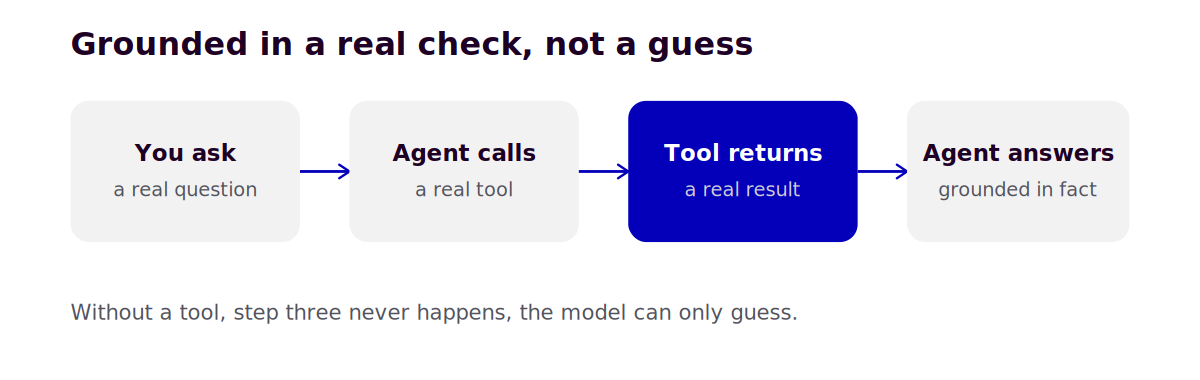
Run this and the assistant does not guess whether the email field exists. It calls the tool, reads the actual response, and answers based on what it found. That distinction, an answer grounded in a real tool call instead of a plausible sounding guess, is the entire reason to reach for LangChain over a plain chat interface for this kind of task.
Adding a second tool for test case generation
A single tool assistant is useful but narrow. Add a second tool and the same assistant can both check real data and draft test cases informed by what it found.
from langchain.tools import tool

@tool
def save_test_case(title: str, steps: str, expected_result: str) -> str:
    """Save a drafted test case to the local test case file."""
    with open("draft_test_cases.md", "a") as f:
        f.write(f"## {title}\n\nSteps: {steps}\n\nExpected: {expected_result}\n\n")
    return f"Saved test case: {title}"

agent = create_agent(
    model="claude-sonnet-4-6",
    tools=[check_api_response, save_test_case],
    system_prompt=(
        "You are a QA assistant. Check real API responses before writing test cases "
        "about them, and save every test case you draft using the save_test_case tool."
    ),
)
Now a single request, check this endpoint and draft a negative test case for a missing field, results in the assistant fetching real data, reasoning about what could go wrong based on that actual response, and saving a structured test case file you can review and refine.
Where this fits next to an agent framework like Microsoft's
If you have looked at agent orchestration before, you may have run into the Microsoft Agent Framework, which RCV Academy covers elsewhere for building multi agent pipelines with human approval gates. LangChain and the Microsoft Agent Framework solve overlapping problems with different philosophies, LangChain leans toward a large ecosystem of pre built tool integrations and model provider support, while the Microsoft Agent Framework leans toward structured, auditable multi agent workflows. For a first personal test assistant like the one above, LangChain's simpler single agent, few tools starting point is the faster path in.
Frequently asked questions
Do I need to know LangGraph to use LangChain for this? No. LangChain's agents run on LangGraph underneath for orchestration, but the quickstart pattern shown here does not require you to understand or configure it directly.
Can I use a free or local model instead of a paid API? Yes. LangChain supports Ollama for running models locally with no API key required, which is a reasonable way to experiment with this pattern before committing to a paid provider.
Is this assistant something I could actually rely on for real testing work? As a starting point for drafting and research, yes. Treat its output the same way you would treat a junior team member's first draft, review before trusting, especially early on while you are still tuning the system prompt and tools to your team's specific conventions.
RCV Academy's Generative AI and AI Agents for QA course builds on exactly this foundation, extending a single tool assistant like this one into a fuller agent workflow across your actual test suite.
Categories: : Agentic AI, AI, AI SDET, AI Tools, Generative AI