n8n for QA teams, automate your bug triage workflow without writing code
 Software Testing Mentor and RCV Academy
Somewhere in every QA team's day, someone opens a failed test run, reads through the logs, checks whether it's a known issue, and either files a new ticket or adds a comment to an existing one. That's maybe ten minutes of work, done dozens of times a week, and almost none of it actually requires a human judgment call. This is exactly the kind of repetitive decision tree n8n was built to take off your plate.
What n8n actually is
n8n is a visual workflow automation tool. You connect blocks representing triggers, actions, and conditions on a canvas instead of writing a script, and increasingly those blocks include AI nodes that can summarize text, classify content, or make a judgment call based on a prompt you write. It's open source, can be self hosted for free, or used through n8n's cloud offering.
The workflow this actually solves
Picture a test failing in your CI pipeline. Right now, that failure sits in a log file until someone manually opens it, reads the stack trace, decides whether it looks like a real bug or a flaky test, checks whether a similar issue already has a ticket, and either files a new one or updates the existing thread. Multiply that by every failure across every run, every day, and it adds up to real hours.
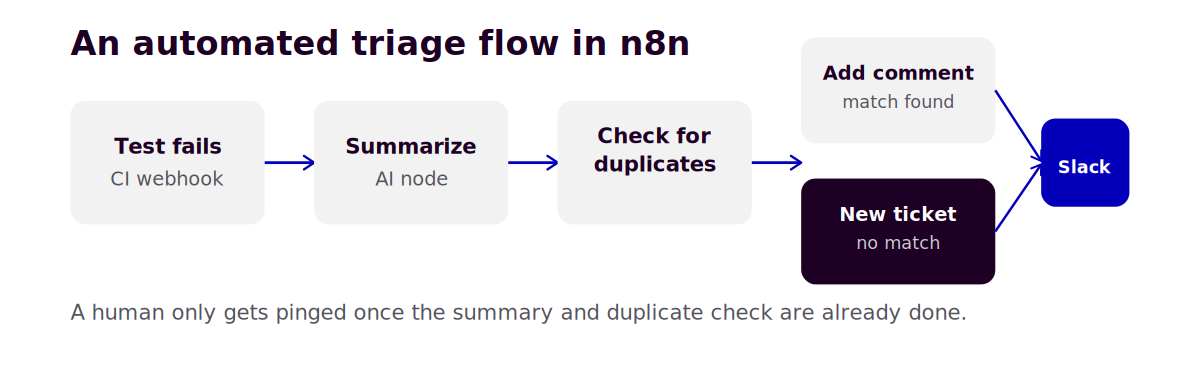
Here's the workflow version. A test fails, which triggers n8n through a webhook from your CI system. An AI node reads the failure logs and produces a plain language summary of what broke. Another step checks that summary against your existing open tickets, looking for a close match. If a match exists, n8n adds a comment to the existing ticket with the new occurrence. If nothing matches closely enough, n8n creates a new ticket in Jira with the summary already written, and only then does a Slack message go to your team, so a human's attention gets pulled in exactly when it's actually needed.
Building the basic version
You don't need to build the full pipeline on day one. Start with three nodes.
- Trigger, a webhook that fires when your CI system reports a test failure, most CI tools support this natively
- AI summarization, an OpenAI or Claude node that takes the raw failure log and produces a two sentence plain language summary
- Notification, a Slack node that posts that summary to your team channel
That alone saves the ten minutes of manual log reading, even before you add duplicate detection or automatic ticket creation. Get this working first, confirm it's actually useful, then extend it.
Adding duplicate detection
Once the basic summarization step works reliably, the next addition is checking whether this failure has already been seen. This usually means a node that queries your Jira or bug tracker for recently opened tickets, followed by an AI node comparing the new summary against those existing ticket descriptions for similarity. If the AI judges them similar enough, route to "add comment," otherwise route to "create new ticket." This branching logic is exactly what n8n's visual canvas is built for, since you can see the decision tree laid out rather than buried in nested conditional code.
What to keep a human in the loop for
Don't fully automate ticket priority or severity assignment without review, at least at first. An AI summary is genuinely good at describing what happened, but judging how urgent a failure is often depends on context the automation doesn't have, whether this is a payment flow versus a cosmetic issue, for instance. A safer pattern is to let automation handle summarization and routing, while priority and severity stay a quick human decision made faster because the summary and duplicate check already happened.
Where this breaks down
Automation like this works best on failures with clear, parseable logs. A flaky test that fails intermittently for timing reasons will get summarized the same as a genuine regression, since the AI node doesn't inherently know the difference, it's describing what the log says, not diagnosing root cause. Track how often your automated triage misclassifies flaky failures as new bugs, and if it's frequent, that's a sign your test suite has a flakiness problem worth solving directly rather than a signal that the automation is broken.
RCV Academy's Generative AI and AI Agents for QA course covers n8n alongside Claude Code and MCP, building toward exactly this kind of automated triage workflow as a hands on project.
Categories: : Generative AI, n8n, n8n automation, qa, SDET