Playwright MCP explained, build your first AI agent for browser testing
 Software Testing Mentor and RCV Academy
A hands-on guide to Playwright MCP, what it is, how to set it up, and how to build your first AI agent for browser testing.
Traditional Playwright scripts are precise but blind. You write a locator, the test clicks it, and if the page changes even slightly, the whole thing breaks. Playwright MCP flips that around. Instead of a script that blindly follows fixed steps, an AI agent actually looks at the page, understands what is on it, and decides what to click next, the same way a human tester would.
By the time you finish this, you will have it installed, connected to an AI agent, and running its first exploratory session against a real page.
The core idea behind Playwright MCP
The Model Context Protocol is an open standard that lets an AI model talk to external tools through one consistent interface. Playwright MCP is Microsoft's official server that exposes Playwright's browser control as a set of tools an AI agent can call.
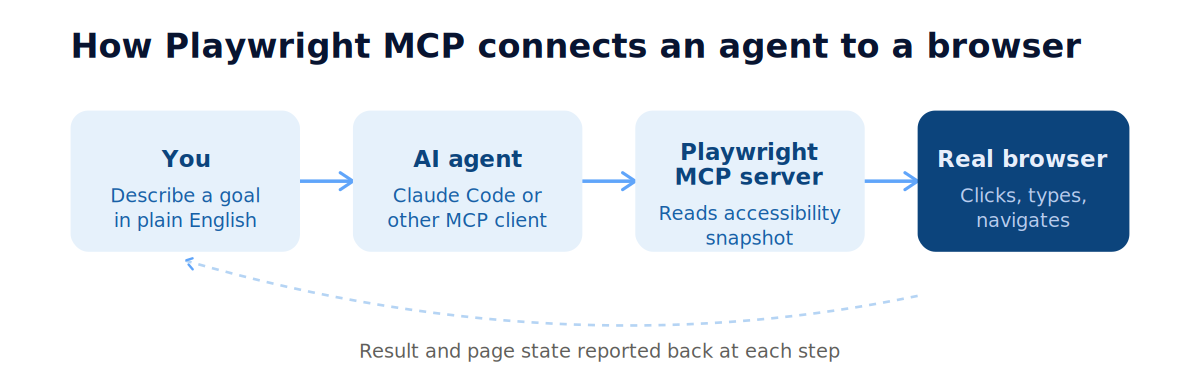
The key difference from a normal AI coding assistant guessing at HTML is that Playwright MCP gives the model a structured accessibility snapshot of the page, not a screenshot. That snapshot lists every interactive element, its role, and its label, so the agent knows exactly what a button or field actually is rather than trying to interpret pixels. This makes it faster and considerably more reliable than vision based approaches.
It works with Claude Code, Claude Desktop, Cursor, VS Code, Windsurf, and most other MCP compatible clients, so the setup below applies broadly even though the examples use Claude Code specifically.
What you need before starting
- Node.js 18 or newer
- Claude Code installed and signed in, or another MCP compatible client
- No existing Playwright project required to start exploring, though you will want one to save generated tests into
You do not need to install Playwright's browsers yourself. The MCP server downloads Chromium the first time it runs.
Setting it up with Claude Code
Registering the server takes one command, run from your terminal.
claude mcp add playwright npx @playwright/mcp@latest
This registers Playwright MCP and saves the configuration so it persists across sessions. For a team setup you want to share through version control, add a scope flag instead.
claude mcp add --scope project playwright npx @playwright/mcp@latest
Once registered, start Claude Code as usual inside your project folder. The agent now has browser tools available any time you ask for something that needs one.
Your first agent driven session
Instead of writing a script line by line, you describe a goal and let the agent explore.
> Go to our staging login page, sign in with the test account, and confirm the dashboard loads
> Now add an item to the cart and complete checkout, tell me if anything looks broken along the way
> Write this as a Playwright test in TypeScript, following our existing page object structure
The agent navigates the real page, reads the accessibility tree at each step, decides what to click or type, and reports back what it found. Once you are satisfied the flow works, asking it to write the corresponding test converts that exploration into a durable script you commit to your repository, the same as any test you would write by hand.
Why this matters for QA specifically
This changes where the effort in test authoring actually goes. Instead of spending time translating a manual test case into exact selectors, you spend that time describing the behaviour you care about, and the agent handles the mechanical translation. It also means exploratory testing and automation are no longer two separate activities done at two separate times, the agent can explore an unfamiliar flow and hand you a runnable test from the same session.
It is worth being clear about what this is not. The agent driven exploration is best used to author and maintain tests, not as your permanent test execution method. Once a script exists, running it through Playwright's normal test runner remains faster and cheaper than re running an agent every time, so the agent is a authoring tool sitting on top of your existing automation, not a replacement for it.
A few practical notes
Pin a specific version rather than using latest for shared or CI configurations, since beta releases can occasionally introduce intermittent tool failures.
claude mcp add playwright npx @playwright/mcp@0.0.40
If you need the agent to work on a page behind a login, run it headed once to sign in manually and save the session, then future runs can reuse that saved authentication instead of logging in every time. Treat that saved session file the same way you would treat a password, keep it out of version control and restrict who can access it.
Some common misconceptions explained
Does this replace writing Playwright tests by hand?
No. It changes how the first draft of a test gets written, from typing selectors manually to describing a goal and letting the agent explore, but the output is still a normal Playwright test file that runs the same way through your existing test runner.
Do I need to already know Playwright to use this?
Basic familiarity helps, since you will still want to read and adjust the generated test. But the agent handles the hardest part for beginners, finding the correct selectors and structuring the flow, which lowers the bar significantly.
Can this run in CI?
Yes, Playwright MCP supports headless mode, so it can run inside a pipeline the same way any other automated step does, though most teams use it interactively for authoring and rely on the normal Playwright test runner for continuous execution.
To build on this hands on, Our Playwright course covers the workflow end to end, from writing your first traditional test through to directing an AI agent with MCP for exploratory automation.
Categories: : AI, Automation, MCP, Playwright